> ## Documentation Index
> Fetch the complete documentation index at: https://docs.muna.ai/llms.txt
> Use this file to discover all available pages before exploring further.
# Compiling Models
> Compiling your models into self-contained binaries.
Muna compiles stateless Python functions into self-contained executable binaries.
Your Python code is lowered directly to native code, and does not rely on
the Python runtime (or any other managed runtime).
## Defining a Function
Write your function, add a docstring, then wrap it with our `@compile` decorator:
```py greeting.py icon="python" theme={null}
from muna import compile
@compile()
def greeting(name: str) -> str:
"""
Say a friendly greeting.
"""
return f"Hey there {name}! We're glad you're using Muna and we hope you like it."
```
The docstring is used as a description, is required, and must be 100 characters or less.
The function **must** specify parameter and return type annotations. [Learn more](/predictors/requirements).
## Compiling the Function
Use the Muna CLI to compile the function. First, make sure you are logged into the Muna CLI:
```bash icon="terminal" theme={null}
# Login to the CLI
$ muna auth login
```
Then run the following command:
```bash icon="terminal" theme={null}
# Compile the function
$ muna compile --overwrite greeting.py
```
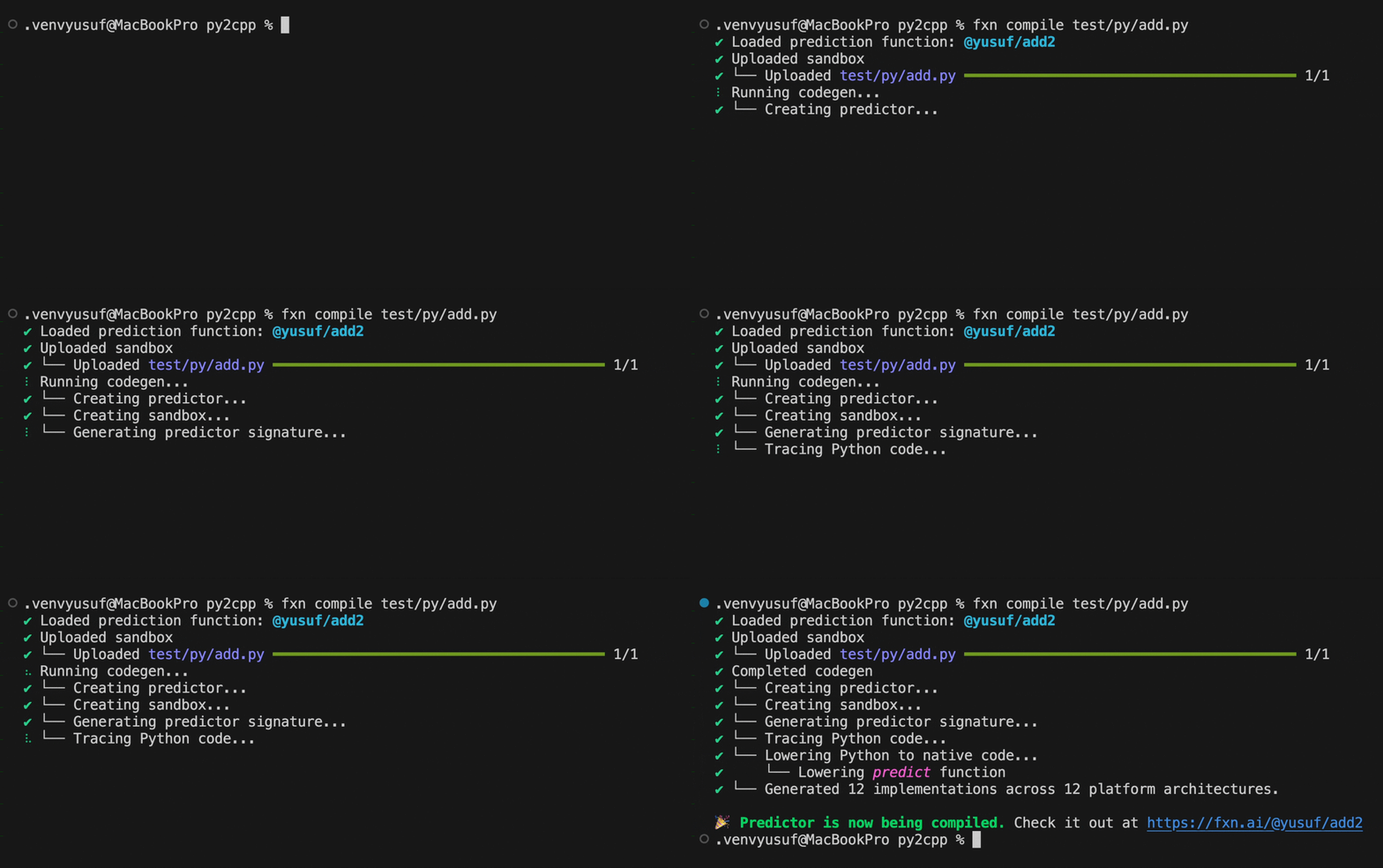
Muna will upload your code, perform code generation on your function and its dependencies,
then compile for our supported platforms:
 ## Using the Function
Depending on the complexity of your function, it can take anywhere from a few seconds to a
few minutes for the function to be compiled for all platforms. Once the function is compiled, you can
run it everywhere:
```ts JavaScript icon="js" theme={null}
import { Muna } from "muna"
// 💥 Create your Muna client
const muna = new Muna({ accessKey: "..." });
// 🔥 Make a prediction
const prediction = await muna.predictions.create({
tag: "@your-username/greeting",
inputs: { name: "Lina" }
});
// 🚀 Print the result
console.log(prediction.results[0]);
```
```py Python icon="python" theme={null}
from muna import Muna
# 💥 Create your Muna client
muna = Muna(access_key="...")
# 🔥 Make a prediction
prediction = muna.predictions.create(
tag="@your-username/greeting",
inputs={ "name": "Lina" }
)
# 🚀 Use the results
print(prediction.results[0])
```
```swift iOS icon="swift" theme={null}
import Muna
// 💥 Create a Muna client
let muna = Muna(accessKey: "...")
// 🔥 Make a prediction
let prediction = try await muna.predictions.create(
tag: "@your-username/greeting",
inputs: ["name": "Lina"]
)
// 🚀 Use the results
print(prediction.results![0])
```
```kt Android icon="android" theme={null}
import ai.muna.muna.Muna
// 💥 Create a Muna client
val muna = Muna("...")
// 🔥 Make a prediction
val prediction = muna.predictions.create(
"@your-username/greeting",
mapOf("name" to "Lina")
)
// 🚀 Use the results
println(prediction.results!![0])
```
```csharp Unity icon="unity" theme={null}
using Muna;
// 💥 Create your Muna client
var muna = new Muna(accessKey: "...");
// 🔥 Make a prediction
var prediction = await muna.Predictions.Create(
tag: "@your-username/greeting",
inputs: new() { ["name"] = "Lina" }
);
// 🚀 Use the results
Debug.Log(prediction.results[0]);
```
```bash CLI icon="terminal" theme={null}
# 🔥 Make a prediction
$ muna predict @your-username/greeting --name Lina
```
You can check the compilation status of the function at [muna.ai/predictors](https://muna.ai/predictors).
## Using the Function
Depending on the complexity of your function, it can take anywhere from a few seconds to a
few minutes for the function to be compiled for all platforms. Once the function is compiled, you can
run it everywhere:
```ts JavaScript icon="js" theme={null}
import { Muna } from "muna"
// 💥 Create your Muna client
const muna = new Muna({ accessKey: "..." });
// 🔥 Make a prediction
const prediction = await muna.predictions.create({
tag: "@your-username/greeting",
inputs: { name: "Lina" }
});
// 🚀 Print the result
console.log(prediction.results[0]);
```
```py Python icon="python" theme={null}
from muna import Muna
# 💥 Create your Muna client
muna = Muna(access_key="...")
# 🔥 Make a prediction
prediction = muna.predictions.create(
tag="@your-username/greeting",
inputs={ "name": "Lina" }
)
# 🚀 Use the results
print(prediction.results[0])
```
```swift iOS icon="swift" theme={null}
import Muna
// 💥 Create a Muna client
let muna = Muna(accessKey: "...")
// 🔥 Make a prediction
let prediction = try await muna.predictions.create(
tag: "@your-username/greeting",
inputs: ["name": "Lina"]
)
// 🚀 Use the results
print(prediction.results![0])
```
```kt Android icon="android" theme={null}
import ai.muna.muna.Muna
// 💥 Create a Muna client
val muna = Muna("...")
// 🔥 Make a prediction
val prediction = muna.predictions.create(
"@your-username/greeting",
mapOf("name" to "Lina")
)
// 🚀 Use the results
println(prediction.results!![0])
```
```csharp Unity icon="unity" theme={null}
using Muna;
// 💥 Create your Muna client
var muna = new Muna(accessKey: "...");
// 🔥 Make a prediction
var prediction = await muna.Predictions.Create(
tag: "@your-username/greeting",
inputs: new() { ["name"] = "Lina" }
);
// 🚀 Use the results
Debug.Log(prediction.results[0]);
```
```bash CLI icon="terminal" theme={null}
# 🔥 Make a prediction
$ muna predict @your-username/greeting --name Lina
```
You can check the compilation status of the function at [muna.ai/predictors](https://muna.ai/predictors).